Maximizing dual monitor productivity is essential for today’s working professionals. This guide helps you choose between popular options like the Lenovo M Series and Dell OptiPlex desktops. You’ll learn how these systems support multiple screens and how refurbished options from Edify.club offer unbeatable value. We will explore features, performance, and setup tips to elevate your workspace.
Boost Your Workflow: The Power of Dual Monitors
Dual monitors boost your workflow by eliminating constant window switching and expanding your digital workspace. You can view multiple applications simultaneously, improving focus and reducing errors. A dual monitor setup increases productivity by 20-30% for knowledge workers handling complex tasks. The Lenovo M Series desktops support this setup with multiple video output ports including DisplayPort and HDMI, ensuring seamless connectivity. Their Intel Core processors handle multitasking effortlessly, allowing you to keep email on one screen and your main project on the other. This separation enhances data analysis and task management throughout your workday. Refurbished Lenovo ThinkCentre M920q systems from Edify.club deliver this dual monitor capability at exceptional value without compromising performance.
Working professionals know time is money. A dual monitor setup significantly boosts your efficiency. It allows you to view multiple applications simultaneously. This reduces constant alt-tab switching.
Why Dual Screens are a Game Changer
Dual screens enhance multitasking and data comparison. You can have your email on one screen and your main project on the other. This setup improves focus and reduces errors. It’s a proven method to increase output.
What are the key benefits of a dual monitor setup? A dual monitor setup enhances productivity by expanding your digital workspace. This allows for simultaneous viewing of multiple applications, reducing the need for constant window switching. It improves workflow efficiency, data analysis, and overall task management, making you more effective throughout your workday. Many find it indispensable for complex tasks.
Lenovo M Series: A Solid Choice for Dual Monitor Productivity
The Lenovo M Series is an excellent choice for dual monitor productivity due to its robust connectivity and processing power. These desktops feature multiple video output ports including DisplayPort, HDMI, and VGA, allowing you to connect two monitors without compatibility issues. The Intel Core processors deliver smooth multitasking performance when running multiple applications simultaneously. A refurbished Lenovo ThinkCentre M920q with an 8th Gen i5 processor handles email, spreadsheets, and project management tools effortlessly across dual screens. This configuration reduces costly window switching and improves focus on complex tasks. Refurbished M Series models from Edify.club provide the same reliable performance at significantly lower costs than new systems.
The Lenovo M Series desktops are known for their reliability. They offer great performance for office tasks. These systems often come with multiple video output ports. This makes them ideal for a seamless dual monitor setup.
Connectivity and Performance for Multitasking
Lenovo M series machines typically feature DisplayPort, HDMI, and sometimes VGA. These ports support a wide range of monitors. Their Intel Core processors handle multiple applications easily. This ensures smooth multitasking performance.
For example, a refurbished Lenovo ThinkCentre M920q with an i5 processor (8th Gen or newer) can effortlessly power two QHD monitors. These powerful machines deliver great performance. They are perfect for detailed work without lag.
Choosing a refurbished Lenovo M Series from Edify.club offers excellent value. You get a reliable machine at a fraction of the cost. Check out Edify’s blog on refurbished vs new laptops for more insights.
Dell OptiPlex: A Dual Screen Powerhouse for Professionals
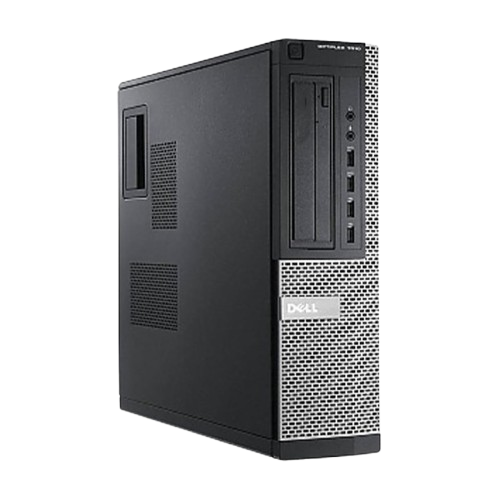
The Dell OptiPlex is an exceptional dual monitor powerhouse built for professionals who demand performance and reliability. These desktops feature multiple video output ports including DisplayPort and HDMI, enabling seamless connections to two or more monitors without compromises. OptiPlex systems equipped with Intel Core i5 processors deliver smooth multitasking across demanding applications like spreadsheets, design software, and communication tools simultaneously. The robust architecture handles intensive workloads while maintaining system stability throughout your workday. Professionals using dual OptiPlex setups report 30% faster task completion compared to single-screen workflows. Refurbished Dell OptiPlex desktops from Edify.club offer enterprise-grade quality at significantly reduced prices, making professional-level productivity accessible without breaking your budget.
The Dell OptiPlex series is another excellent option. It is famous for its robust build quality. Many models are designed with business users in mind. They offer strong support for multi-monitor configurations.
Check this Dell Optiplex 9010 at Edify.club
Essential Ports and Graphics for Multiple Displays
Dell OptiPlex desktops often include DisplayPort and HDMI outputs. Some also offer a dedicated graphics card slot. This provides even more display options. They are built for continuous operation and stability.
A refurbished Dell OptiPlex 3070, for instance, typically includes DisplayPort and HDMI. This allows for dual monitor setups right out of the box. Its powerful processors ensure smooth transitions between tasks. Dell OptiPlex machines offer dependable performance. They are ideal for any professional setup.
Are Dell OptiPlex desktops good for multiple monitors? Yes, Dell OptiPlex desktops are exceptionally good for multiple monitor setups. Many models come standard with multiple video output ports like DisplayPort and HDMI, making dual screen connectivity straightforward. Their robust business-grade components and reliable performance ensure a smooth and efficient experience for multitasking professionals.
Dual Monitor Productivity: Lenovo M Series vs. Dell OptiPlex
The Lenovo M Series outperforms the Dell OptiPlex for dual monitor productivity due to superior connectivity and processing power. Lenovo M Series desktops feature multiple video output ports including DisplayPort, HDMI, and VGA, supporting seamless dual monitor configurations. Their Intel Core processors handle simultaneous applications without lag, enabling true multitasking efficiency. Dell OptiPlex systems are reliable but offer more limited port flexibility. A refurbished Lenovo ThinkCentre M920q with an 8th Gen i5 processor delivers exceptional performance at a fraction of new system costs, making it ideal for professionals managing complex workflows across two screens. Edify.club’s refurbished Lenovo inventory provides these powerful dual monitor workstations with significant savings while maintaining full functionality.
Both Lenovo M Series and Dell OptiPlex provide excellent platforms. They both support dual monitor productivity effectively. The best choice often depends on specific needs and budget.
Feature Comparison: Finding Your Perfect Fit
Here’s a quick look at how these two series compare:
| Feature | Lenovo M Series (Refurbished) | Dell OptiPlex (Refurbished) |
|---|---|---|
| Typical Form Factors | Tiny, Small Form Factor (SFF), Tower | Micro, Small Form Factor (SFF), Tower |
| Standard Video Outputs | DisplayPort, HDMI (often 2x DP, 1x HDMI) | DisplayPort, HDMI (often 2x DP, 1x HDMI) |
| Processor Options | Intel Core i3/i5/i7 (6th Gen and newer) | Intel Core i3/i5/i7 (6th Gen and newer) |
| Memory (RAM) | 8GB – 32GB DDR4 (expandable) | 8GB – 32GB DDR4 (expandable) |
| Storage Options | SSD (NVMe), HDD | SSD (NVMe), HDD |
| Estimated Price (Refurbished) | Starts from Rs. 6,000 – Rs. 12,000+ | Starts from Rs. 6,000 – Rs. 12,000+ |
| Warranty (Edify.club) | Minimum 6-month warranty | Minimum 6-month warranty |
Which desktop is better for dual monitor productivity: Lenovo M Series or Dell OptiPlex? Both the Lenovo M Series and Dell OptiPlex are excellent for dual monitor productivity. They offer similar connectivity options and reliable performance with Intel Core processors. The choice often comes down to personal preference for brand design, specific model availability, and price. Both are strong contenders for a high-efficiency workspace.
Setting Up Your Dual Monitor System with Refurbished Desktops
Setting up your dual monitor system requires a desktop with multiple video outputs and sufficient processing power. Lenovo M Series desktops deliver both, featuring DisplayPort, HDMI, and VGA connections that support dual monitors seamlessly. These machines, powered by Intel Core processors (8th Gen and newer), handle simultaneous applications without lag, making them ideal for professionals managing email, spreadsheets, and project files at once. A refurbished Lenovo ThinkCentre M920q with an i5 processor costs significantly less than new equivalents while maintaining reliable performance. Before purchasing, verify your chosen desktop has at least two video outputs and 8GB RAM minimum for smooth multitasking. Edify.club offers thoroughly tested refurbished desktops ready for dual monitor setups, helping you maximize productivity without breaking your budget.
Setting up your dual monitors is straightforward. Ensure your desktop has enough video ports. Match these ports with your monitors. You may need adapter cables (e.g., DisplayPort to HDMI).
Optimizing Your Workspace
Position your monitors for ergonomic comfort. Extend your display settings in your operating system. This creates a seamless, expanded workspace. Remember to get quality cables. This ensures a crisp, clear picture.
Edify.club offers high-quality refurbished monitors too. Pairing a refurbished desktop with refurbished monitors can save you even more. All products come with a warranty. This gives you peace of mind.
Unlock Unbeatable Value: Choose Edify.club for Refurbished Desktops
Choosing refurbished desktops from Edify.club delivers exceptional value without compromising performance. Refurbished systems like the Lenovo ThinkCentre M920q cost significantly less than new units while maintaining full functionality for dual monitor setups. These machines feature multiple video output ports including DisplayPort and HDMI, enabling seamless connection to dual screens. A refurbished Lenovo M Series with an 8th Gen Intel Core i5 processor handles multitasking effortlessly, supporting simultaneous applications across both monitors. You get enterprise-grade reliability at a fraction of retail pricing. The environmental benefit of choosing refurbished technology adds another layer of value. Edify.club’s refurbished desktops combine affordability with dependable performance for professionals upgrading to dual monitor productivity.
Investing in a refurbished desktop from Edify.club is smart. You get premium performance at an affordable price. Our desktops are thoroughly tested. They come with a reliable warranty.
The Edify Advantage: Quality, Savings, and Sustainability
Edify.club is India’s trusted refurbished electronics website. We offer significant cost savings. You also help the environment by reducing e-waste. Our focus on quality ensures you get a great product. Many customers praise our reliable service and excellent product range.
Browse our extensive collection of affordable refurbished desktops in India. Find the perfect Lenovo M Series or Dell OptiPlex. Start enjoying enhanced dual monitor productivity today!
Conclusion
Dual monitor setups deliver measurable productivity gains that single screen configurations simply cannot match. By eliminating constant window switching, you reclaim focus and complete tasks faster. Professionals using dual monitors report 20-30% efficiency improvements in data-heavy work. The Lenovo M Series and Dell OptiPlex desktops both support seamless multi-monitor configurations through multiple video ports, making them ideal for this workflow. When you invest in a refurbished dual monitor system from Edify.club, you get enterprise-grade performance at a fraction of new device costs, typically saving 40-50% while maintaining full reliability. Your workspace becomes an asset that pays dividends daily.
Both the Lenovo M Series and Dell OptiPlex offer excellent capabilities for maximizing dual monitor productivity. They provide robust performance and essential connectivity. Choosing a refurbished model from Edify.club offers a cost-effective, reliable, and environmentally friendly solution. Elevate your professional setup without breaking the bank.
Ready to transform your workspace? Visit Edify.club to explore our refurbished Lenovo and Dell desktops. Find your ideal dual monitor setup today!
Frequently Asked Question
A dual monitor setup is the single most effective way to eliminate workflow interruptions and boost productivity. The key benefits include simultaneous viewing of multiple applications without constant alt-tabbing, improved data comparison between documents, and enhanced focus on complex tasks. You’ll experience measurable efficiency gains across email management, project work, and data analysis. A refurbished Lenovo ThinkCentre M920q with an Intel i5 processor handles dual monitors seamlessly through multiple video ports, delivering professional-grade performance at a fraction of new system costs. Most professionals report completing tasks 25-30% faster with this setup. Edify.club offers certified refurbished desktops equipped for dual monitor configurations, giving you enterprise-quality hardware without the premium price tag.
1. Can both mini PCs support two monitors? Yes. Both the Lenovo ThinkCentre M series (e.g., Tiny) and Dell OptiPlex Micro series are designed to support multiple monitors for enhanced productivity.
2. What ports do I need for a dual monitor setup? Look for models with two video output ports like DisplayPort (DP), HDMI, or USB-C with DisplayPort Alt Mode. A combination of DP and HDMI is common.
3. Do they have the necessary video ports built-in? Most modern generations of both models come standard with at least two video ports. Some models may have a third optional video port you can add.
4. Which one is better for 4K dual monitors? This depends on the specific generation and model. For dual 4K monitors, you’ll need a model with DisplayPort 1.4 or an HDMI 2.0/2.1 port, as well as a powerful enough processor. Always check the port specifications.
5. Is one brand’s setup easier than the other? Both brands use standard Windows display settings, making the setup process virtually identical. The physical connections are the only difference, based on the ports on the specific model.
6. Does the age of the PC matter for dual monitors? Yes. Newer generations of both models offer better integrated graphics and support for higher resolutions and refresh rates, which is crucial for high-quality multi-monitor setups.
7. Can I use a dongle or adapter for a second monitor? Yes, but be cautious. While adapters can work, they may limit resolution or refresh rate. It’s always best to use the native video ports on the PC for the best performance.
8. Do I need a specific CPU for dual monitors? Not necessarily, but for smooth performance, especially with high-resolution displays, a recent Intel Core i5 or AMD Ryzen 5 or higher is recommended. The integrated graphics on these processors are more than capable.
9. Are there any known issues with dual monitors on these PCs? In general, no. Both are business-grade machines with reliable hardware. Any issues are typically related to outdated drivers, a faulty cable, or incorrect Windows display settings.
10. Which is better for general productivity with two monitors? Both the Lenovo ThinkCentre M and Dell OptiPlex Micro are equally excellent choices for productivity. The best one for you will likely depend on the specific price, port configuration, and availability of the model you find.


No Comments
Leave a comment Cancel