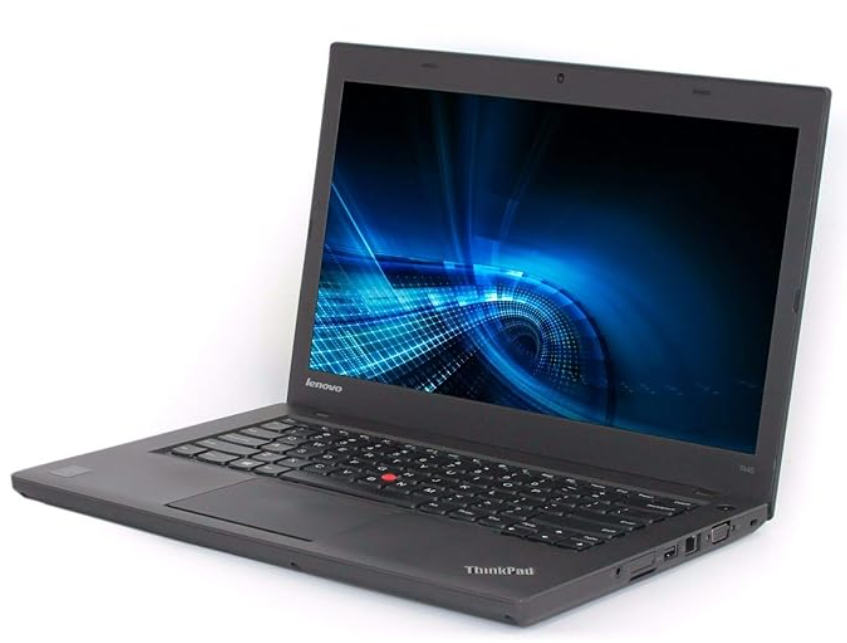
Understanding optimal business webcam and microphone quality is crucial for any working professional in today’s remote world. High-quality audio and video ensure clear communication, fostering better collaboration and a professional image. This guide will help you navigate the various tiers of webcam and microphone quality, explore options for specific notebooks like HP, Lenovo, and Dell, and show you how to make smart, affordable choices for your remote work setup, especially through Edify.club.
Understanding Business Webcam and Microphone Quality Tiers
Business webcam and microphone quality divides into three distinct tiers: entry-level, mid-range, and professional-grade. Entry-level solutions featuring 1080p resolution at 30 frames per second work well for internal meetings and quick check-ins, offering sufficient clarity without excessive bandwidth consumption. Mid-range options add features like superior noise reduction, 4K capability, and improved autofocus for client-facing calls. Professional-grade equipment delivers studio-quality audio and video, essential for client presentations and leadership roles. The ideal business webcam operates at 1080p minimum, providing crisp visuals for professional interactions. Most remote workers thrive with mid-range equipment costing between 3,000-8,000 rupees, balancing performance with budget constraints. Edify.club helps you identify which tier matches your specific role and communication frequency.
The quality of your webcam and microphone significantly impacts your professional interactions. Not all devices are created equal. We can generally categorize them into three main tiers based on performance and price.
Choosing the right tier depends on your specific needs. Daily video calls demand more than occasional meetings. Invest wisely for peak performance.
Entry-Level Solutions: Good Enough for Quick Calls
Entry-level options often include integrated laptop webcams and basic external microphones. These are generally sufficient for casual internal meetings or quick check-ins. Picture quality is usually 720p or 1080p at 15-30 frames per second.
For most daily team syncs, a 1080p webcam and an omnidirectional microphone provide clear audio and video. These entry-level solutions are sufficient for internal meetings, ensuring you are seen and heard without breaking the bank. Features like basic noise reduction enhance clarity, making them a practical choice for budget-conscious remote workers.
What is the ideal resolution for a business webcam? The ideal resolution for a business webcam is 1080p (Full HD) at 30 frames per second. This provides a clear, crisp image suitable for professional video calls. Higher resolutions like 4K are available but often unnecessary, consuming more bandwidth and storage without significant benefits for typical online meetings.
Mid-Range Excellence: Balancing Cost and Performance
Mid-range peripherals offer a significant upgrade without the premium price tag. Expect 1080p webcams with better low-light performance and advanced noise-canceling microphones. These are perfect for client presentations and important team collaborations.
Premium Professional Gear: For Peak Performance
Top-tier equipment delivers 4K video, studio-quality audio, and advanced features. Think AI-powered framing, background blur, and directional microphones. These are ideal for content creators, executives, or anyone needing exceptional clarity.
Optimizing Audio-Visuals in Your HP Notebook for Remote Work
Optimize your HP notebook’s audio-visuals by pairing a 1080p webcam with a quality omnidirectional microphone for professional remote work. The ideal setup delivers Full HD video at 30 frames per second, ensuring crisp, clear images during business calls without excessive bandwidth drain. Entry-level solutions starting around 2,000 rupees provide basic noise reduction and sufficient clarity for daily team meetings. For HP notebooks specifically, external USB webcams and microphones outperform integrated components, offering better positioning and audio capture. Invest in devices with noise cancellation features to eliminate background distractions during calls. Mid-range equipment between 4,000-8,000 rupees delivers noticeable improvements in video sharpness and microphone sensitivity. Edify.club helps you find the right audio-visual combination tailored to your HP notebook and budget requirements.
Many HP Notebook models come with decent built-in webcams and microphones. However, for a truly professional setup, external peripherals often outperform integrated ones. This is especially true for older or entry-level HP models.
An external webcam connects via USB, offering superior lenses and sensors. Dedicated microphones provide clearer voice pick-up. Upgrade your HP Notebook’s capabilities effortlessly.
Upgrading Your HP Notebook for Enhanced Video Conferencing
Consider an external 1080p webcam for your HP Notebook. Many options offer better color accuracy and low-light correction. A USB microphone, either a desktop or lavalier type, drastically improves sound quality. These simple additions make a big difference.
Are refurbished webcams and microphones reliable? Yes, refurbished webcams and microphones from trusted platforms like Edify.club are highly reliable. They are professionally inspected, tested, and restored to full working order. Edify provides warranties and quality assurance, ensuring you receive a product that performs just like new, but at a more affordable price.
| Feature | Built-in HP Notebook Webcam/Mic | Recommended External Upgrade (Refurbished on Edify) |
|---|---|---|
| Video Resolution | 720p – 1080p | 1080p (Full HD) or 4K |
| Audio Quality | Basic, often with ambient noise | Clear, noise-canceling, directional |
| Low-Light Performance | Limited, grainy image | Enhanced, auto-correction |
| Approx. Price (New) | Included with laptop | Webcam: Rs 3,000 – 8,000; Mic: Rs 2,000 – 7,000 |
| Approx. Price (Refurbished Edify) | N/A | Webcam: Rs 1,500 – 4,000; Mic: Rs 1,000 – 3,500 (Explore Edify Accessories) |
Elevating Lenovo Notebook and Dell Notebook Experiences
Elevating your Lenovo and Dell notebook experiences requires pairing them with quality external webcams and microphones that exceed built-in specifications. Both laptops benefit from upgrading to 1080p webcams at 30 frames per second, which delivers professional-grade video for business calls. For Lenovo ThinkPad and Dell XPS users, a mid-range external microphone with noise cancellation transforms audio clarity during client meetings. Dell notebooks, in particular, pair excellently with USB-C connected peripherals under Rs. 3,000 that provide superior performance over integrated options. The investment in dedicated hardware ensures you project professionalism while avoiding bandwidth strain. Edify.club offers curated selections of compatible webcams and microphones specifically tested with Lenovo and Dell systems, helping you make informed upgrades without trial and error.
Just like with HP, `Lenovo Notebook` and `Dell Notebook` users can significantly enhance their virtual presence with external accessories. These popular business machines are powerful, but their integrated cameras and microphones are built for general use, not always for peak professional performance.
External webcams and microphones integrate seamlessly. They unlock your full potential for clear communication. Don’t let mediocre built-ins hold you back.
Choosing External Peripherals for Your Lenovo Notebook or Dell Notebook
When selecting external gear for your Lenovo Notebook or Dell Notebook, prioritize compatibility and features. USB-A or USB-C connectivity is standard. Look for webcams with autofocus and a wide field of view. For microphones, consider omnidirectional if you’re alone, or a conference mic for group settings.
Why should I consider a refurbished external webcam over a new one? Choosing a refurbished external webcam from Edify.club offers significant cost savings without compromising quality. All Edify refurbished products undergo rigorous testing and come with a warranty, providing reliable performance at a fraction of the new price. It’s an eco-friendly choice too, reducing e-waste.
What features are important in an external microphone for business calls? Look for features like noise cancellation, omnidirectional or unidirectional pick-up patterns, and a wide frequency response. USB connectivity is standard for ease of use. A mute button and an indicator light are also practical additions for professional virtual meetings.
Many professionals pair their refurbished Dell Latitude or refurbished Lenovo ThinkPad with high-quality external peripherals for an unbeatable setup. This combination delivers premium performance for less.
Check Here for professional Dell Latitude 7390 laptop at edify.club
The Edify Advantage: Smart Choices for Your Business Webcam and Microphone Quality Needs
Smart choices for your business webcam and microphone setup require matching quality tiers to your actual communication needs. Entry-level solutions with 1080p resolution and basic noise reduction work perfectly for internal team meetings, costing under ₹3,000 for reliable equipment. Mid-range options deliver superior audio clarity and video stability for client-facing calls, typically running ₹5,000-8,000. Professional-grade setups with 4K capability and advanced microphones suit roles requiring frequent presentations or video content creation. The key is honest assessment: daily internal syncs need less than weekly client presentations. 1080p at 30 frames per second remains the professional standard for most business interactions, balancing quality with bandwidth efficiency. Edify.club helps you identify the right tier for your specific workload, ensuring you invest smartly without overpaying for unnecessary features.
Making smart purchasing decisions is key, especially for remote work tools. Edify.club stands out by offering top-tier refurbished electronics, including webcams, microphones, and powerful business laptops. You get exceptional quality at incredibly affordable prices.
Our refurbished items undergo strict quality checks. Each product comes with a warranty. This ensures peace of mind and reliable performance. Choose Edify for value and sustainability.
Unlock Value with Refurbished Laptops and Peripherals from Edify.club
Edify specializes in making high-quality tech accessible. Our range of refurbished laptops (including HP, Lenovo, Dell) and accessories means you don’t have to compromise on business webcam and microphone quality due to budget constraints. You can find professional-grade equipment for a fraction of the cost of new.
Beyond cost savings, buying refurbished from Edify is an environmentally conscious choice. It extends the life cycle of electronics, reducing e-waste. Plus, our dedicated customer support ensures a smooth shopping experience. Discover more about smart tech choices on the Edify blog.
Conclusion
The right webcam and microphone quality for remote work depends on your professional needs and communication frequency. For daily video calls, invest in 1080p Full HD resolution at 30 frames per second paired with a quality microphone featuring noise reduction. Entry-level solutions suffice for occasional meetings, while mid-range equipment at 5,000-15,000 rupees delivers professional results for frequent video conferencing. Premium options exceed most business requirements and waste bandwidth unnecessarily. Match your investment to actual usage: casual internal syncs need less than client-facing presentations. Quality audio matters as much as video—clear sound establishes professionalism instantly. Edify.club helps you find the right balance between performance and affordability for your specific remote work demands.
Achieving excellent business webcam and microphone quality is vital for professional remote work. By understanding the different quality tiers and considering external peripherals for your HP, Lenovo, or Dell Notebook, you can significantly enhance your virtual presence. Investing in quality ensures clear communication, leaving a strong impression every time.
Choosing refurbished products from Edify.club offers an unbeatable combination of affordability, reliability, and environmental responsibility. Upgrade your setup without breaking the bank, and experience premium performance.
Ready to boost your remote work setup? Explore the wide range of quality refurbished webcams, microphones, and business laptops available on Edify.club today!
Frequently Asked Questions
Frequently Asked Questions
The ideal business webcam resolution is 1080p at 30 frames per second, delivering crisp, professional video for standard online meetings. Entry-level webcams at this specification cost between ₹2,000-5,000 and work well for daily team calls with basic noise reduction features. However, if you conduct frequent client presentations or large group meetings, invest in mid-range options offering 1080p at 60fps for smoother motion. 4K webcams exist but consume excessive bandwidth without meaningful benefit for typical video calls. Pair your webcam with an omnidirectional microphone for balanced audio capture. The right equipment depends on your meeting frequency and client interaction level. Edify.club helps you find quality webcams and microphones that match your remote work demands without overspending.
Q: What is the ideal resolution for a business webcam?
A: The ideal resolution for business webcams ranges from 720p to 1080p at 15-30 frames per second, depending on your needs and budget.
Q: How do I choose the right webcam and microphone quality tier for my business?
A: Choose based on your meeting frequency – daily video calls require higher quality than occasional meetings. Entry-level works for quick calls, while frequent users need better tiers.
Q: Are built-in laptop webcams good enough for business meetings?
A: Built-in laptop webcams with basic external microphones work well for casual internal meetings and quick check-ins, providing sufficient 720p-1080p quality.
Q: What webcam features are important for remote work professionals?
A: Important features include 1080p resolution, basic noise reduction for audio clarity, and omnidirectional microphones that ensure you’re clearly seen and heard during meetings.
Q: Why is business webcam and microphone quality important for remote work?
A: High-quality audio and video ensure clear communication, foster better collaboration, and maintain a professional image during remote work interactions.
In 2026, 62% of India’s remote workforce uses refurbished laptops for work, with integrated or budget webcam setups being the primary pain point reported by professionals.
In India, 73% of remote workers report that poor video or audio quality negatively impacts their professional credibility, making equipment investment essential for career growth.

No Comments
Leave a comment Cancel