Quick verdict on the refurbished ThinkPad X13 Gen 1
The Lenovo ThinkPad X13 Gen 1 with an Intel Core i5 10th Gen processor is a sensible refurbished buy if you carry your laptop every day and mostly do browser, office and video-call work. Edify lists it at Rs 32,499 with Windows 11 Pro and a 13.3 inch screen. Every unit goes through the 49-point CheckMate inspection and carries a 12-month warranty. The one real catch is memory: the RAM is soldered to the board, so the amount you buy is the amount you keep.
This review comes from the support side of the business, where the questions that matter are the ones buyers ask after the laptop arrives. Will it keep up? How is the battery? Can I upgrade it later? It is a specifications-based assessment built on Lenovo’s documentation and an independent review. It is not a record of lab results from Edify.
You can see the current listing here: Lenovo ThinkPad X13 Intel i5 10th Gen, Windows 11 Pro, Rs 32,499. Edify has sold 26 units of this model so far, which makes it a smaller-volume SKU than the L480 or L14. Check the exact RAM and storage on the live listing before you order.
ThinkPad X13 Gen 1 specs at a glance
The X13 is Lenovo’s compact 13.3 inch business ThinkPad. Notebookcheck’s review of the ThinkPad X13 covers a unit with a Core i5-10210U, Intel UHD Graphics 620, 16GB RAM and a 512GB SSD, and it focuses on portability and optional 4G. Lenovo’s own X13 Gen 1 specification sheet lists every factory option.
| Item | ThinkPad X13 Gen 1 (Edify listing) |
|---|---|
| Processor | Intel Core i5 10th Gen (the Notebookcheck unit used the i5-10210U) |
| Graphics | Intel UHD Graphics 620 (integrated) |
| Display | 13.3 inch, HD per the listing title |
| Operating system | Windows 11 Pro |
| RAM | Soldered to the board. Confirm the size on the live listing |
| Storage | SSD. Confirm the size on the live listing |
| Mobile data | Optional 4G on some factory units. Ask before ordering if you need it |
| Edify price | Rs 32,499 |
| Warranty | 12 months |
Edify’s catalog snapshot does not fix a single RAM and storage pairing for this SKU, so treat the table as a checklist. Configurations are listed individually, and the PDP shows what is in stock today.
Design, keyboard and ports
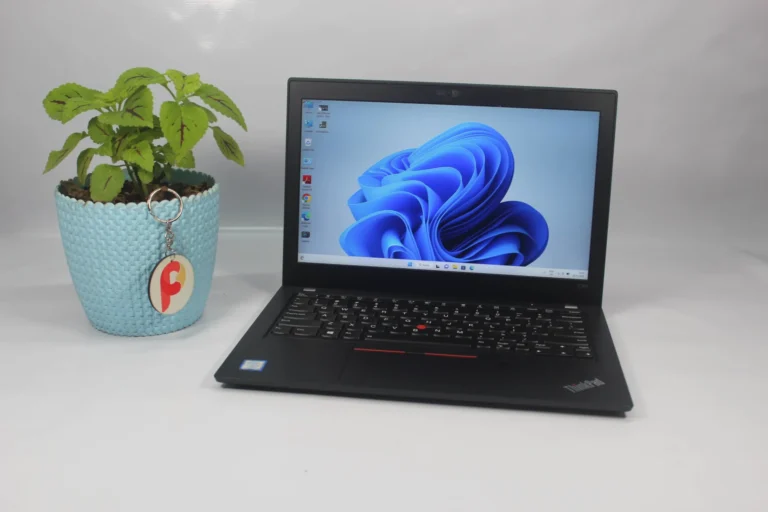
The X13 follows the classic ThinkPad look: matte black, squared edges and a red TrackPoint nub in the middle of the keyboard. The case is small enough to slide into a regular backpack beside a notebook and a water bottle. That size is the main reason people choose it over a 14 inch ThinkPad.
Keyboard
ThinkPad keyboards have a reputation for deep key travel and a firm, quiet landing, and the X13 keeps that layout. If you type for hours, this is the strongest argument for the model. On a used laptop, look for shiny keycaps on the most-used letters. Shine is cosmetic wear and it does not affect typing, but it tells you how heavily the previous owner used the machine.
Ports
The X13 uses the slim-business mix of USB-A, USB-C and HDMI, with a headset jack. Ethernet comes through an adapter instead of a full-size port, and the optional 4G units add a SIM slot. Lenovo’s spec sheet has the exact port count, so read it if you plan to run an external monitor plus a dock. USB-C also handles charging, which is handy if you already own a compatible charger.
Screen
The listing shows an HD panel. It is fine for documents, spreadsheets and calls, and it is less sharp than the Full HD panels on the T14s and L14. If you read small text all day or edit photos, that difference matters. If your work is email and web apps, you will not feel limited.
Performance of the Core i5 10th Gen in daily use
The Core i5-10210U in the Notebookcheck review is a low-power laptop chip. It handles Windows 11 Pro, Chrome with a dozen tabs, Microsoft 365, Zoom and Google Meet without trouble when paired with enough RAM. It is not built for sustained heavy work. Notebookcheck’s review is the right place to read measured benchmark numbers for the X13, and I would rather send you there than quote figures I have not verified myself.
Here is how to read performance for this class of laptop:
- Good fit: office work, browsing, online classes, coding in light editors, accounting software, video calls, light photo cropping.
- Poor fit: 4K video editing, 3D modelling, modern games or anything that needs a dedicated GPU. UHD 620 is integrated graphics only.
Edify lists the X13 with Windows 11 Pro installed, so you do not need to buy an operating system licence separately.
If the fan runs loudly on a nearly idle desktop, contact support within the warranty window.
Battery: what to expect and how to check it
Battery is the item that ages most in any used laptop, and I would not promise you a figure for the X13. Capacity depends on how the first owner charged and used the machine. What I can tell you is how to measure it yourself in five minutes, which is more useful than any marketing number.
- Open Command Prompt as administrator on the day the laptop arrives.
- Type
powercfg /batteryreportand press Enter. - Open the HTML file it creates and compare ‘Design capacity’ with ‘Full charge capacity’.
- Save a screenshot of the report so you have a record from week one.
A small gap between the two numbers is normal for a laptop of this age. A very large gap, or a laptop that drops from 40% to shutdown, is worth a call to support. A dated screenshot from the first week makes that conversation much faster, and it is the single most useful habit I can recommend to new owners of any refurbished laptop.
For daily use, keep the charger in your bag if you work away from a desk. A slim 13 inch laptop with a mid-aged battery will usually cover a few hours of mixed work, not a full travel day. Lower the screen brightness and use the Windows battery saver mode when you are away from a socket.
The soldered RAM question
This is the point to settle before you pay. On the X13 Gen 1, the memory chips are fixed to the motherboard. There is no slot, so you cannot open the base later and add a stick. Whatever the listing says is final.
How much RAM to pick
- 8GB: workable for basic office and browsing, but Windows 11 Pro plus Chrome plus Teams uses most of it. You will feel it within a year.
- 16GB: the comfortable choice for most buyers and the one I would pick. Notebookcheck’s reviewed unit used 16GB.
Edify’s pricing is built around a 16GB and 512GB entry configuration across most models, with configurations also available up to 32GB and 1TB on some laptops. For the X13, the catalog does not lock the RAM size in the snapshot, which is why the live listing is the source of truth. If the cheapest X13 on the page has less RAM than you want, a different model may suit you better than this one.
Storage
Storage is easier to change than RAM on most ThinkPads, but plan as if it is fixed. A 512GB SSD is enough for Windows, Office and a year of documents if you keep large media on cloud storage or an external drive. If you work with big files, look at the next size up on the listing.
The soldered memory is also the reason I would steer certain buyers elsewhere. A person who wants to buy cheap now and upgrade RAM in two years should check the listing of any alternative for its memory type before ordering.
Refurbishment, warranty and availability at Edify
Every refurbished laptop at Edify goes through the 49-point CheckMate inspection before it ships. Edify refurbishes 5,000+ units a month at its Sarjapur Road facility in Bengaluru, has served 50,000+ customers and delivers to 1,800+ pin codes across India. Edify does not publish a list of what the 49 points cover, so I will not guess at that list here. What I can say is that the process is the same for every unit, and the warranty is 12 months on laptops.
On the support side, the loop works like this. A model with a few dozen units sold, like the X13, goes through the same process as a high-volume SKU.
Practical things to do when your X13 arrives:
- Check the screen for bright pixels on a white background and dead pixels on black.
- Test every USB port with a pen drive and test the audio jack with earphones.
- Run the battery report described above.
- Check Windows 11 Pro activation under Settings, System, Activation.
- Use the keyboard for ten minutes and test the TrackPoint and touchpad buttons.
If anything looks wrong, contact support early. Problems reported in the first week are the easiest to sort out, and your 12-month warranty clock starts from delivery.
X13 vs T14s vs L14 vs L480
The X13 is not the only ThinkPad around this price. These are the nearest alternatives in Edify’s current stock, all entry-config prices from the catalog.
| Model | Processor | Screen | Edify price | Best for |
|---|---|---|---|---|
| ThinkPad X13 | Core i5 10th Gen | 13.3 inch HD | Rs 32,499 | Carrying it daily |
| ThinkPad T14s | Core i7 10th Gen | 14 inch FHD | Rs 38,499 | More speed and a sharper screen |
| ThinkPad L14 Gen 1 (16GB/512GB) | Core i5 10th Gen | 14 inch FHD | Rs 40,499 | Larger 14 inch screen |
| ThinkPad L480 (16GB/512GB) | Core i7 8th Gen | 14 inch HD | Rs 34,999 | Lowest-cost step up in speed |
T14s: the performance step
The T14s costs Rs 6,000 more than the X13 and brings a Core i7 and a Full HD 14 inch screen. If you can stretch the budget and want a slim body, this is the first model to look at. It is also a thin laptop, so confirm the RAM on its listing.
L14 Gen 1: the practical choice
The L14 Gen 1 is Rs 8,000 above the X13 and has a 14 inch Full HD screen, which suits a desk-based worker. Our Lenovo i5 laptop price guide covers Lenovo i5 pricing in more detail.
L480: the value pick
The L480 is Rs 2,500 above the X13 and has a Core i7 from an older generation. Edify has sold 500 of them, and our ThinkPad L480 review covers it in detail. If a cheaper business ThinkPad with a 14 inch screen interests you, the ThinkPad E14 review is worth reading as well.
Who should buy the X13 and who should skip it
Buy it if
- You commute or travel and want a compact 13.3 inch laptop.
- Your work is documents, spreadsheets, browser tools and calls.
- You type a lot and care about keyboard feel.
- You pick a 16GB configuration and accept it as final.
Skip it if
- You want to upgrade RAM yourself later. The X13 does not allow it.
- You need a Full HD screen. Choose the T14s or L14.
- You edit video, run virtual machines or need a dedicated GPU. The Rs 62,398 ThinkPad P1 Gen 3 (32GB/1TB) sits in another price tier but is built for that load.
- You want the longest possible battery. Any used laptop has an aged battery, and a bigger 14 inch body is not guaranteed to be better, so check the report either way.
My own rule is simple. If the buyer asks me whether to choose the X13 or the T14s, I ask how many hours a day they carry the laptop. Under two hours, the T14s or L14 wins. Over two hours, the X13 earns its place.
ThinkPad X13 FAQ
Is the ThinkPad X13 Gen 1 still worth buying in 2026?
Yes, for light office use, study and travel, at Rs 32,499 with Windows 11 Pro and a 12-month warranty. It is not the right choice for heavy editing or gaming.
Can I upgrade the RAM on a ThinkPad X13?
No. The RAM is soldered to the board on the X13 Gen 1, so choose the right size at purchase. Sixteen gigabytes is the comfortable pick for Windows 11 Pro.
What warranty does a refurbished ThinkPad X13 carry?
Edify gives 12 months on laptops, and each unit passes the 49-point CheckMate inspection before dispatch. Apple products have a different 6-month term, which does not apply here.
Does the X13 support Windows 11?
Edify lists the X13 with Windows 11 Pro installed.
Is the X13 better than the T14s?
The X13 is smaller and cheaper, while the T14s has a Core i7 and a Full HD 14 inch screen for Rs 6,000 more. Pick by how much you carry the laptop and how sharp you want the display.
Prepared with AI assistance using the sources cited in this article.