Certified by Edify Club: Every laptop passes a 49-point CheckMate certified quality check and ships with a 12-month warranty. Trusted by 50,000+ customers across 1,800+ pin codes in India. Browse certified refurbished laptops.
Buying a refurbished laptop should feel exciting… but for many people in India, it comes with fear, doubt, and a huge risk. That’s why learning how to check refurbished laptop India has become more important than ever. One wrong purchase can drain your savings, slow down your studies, or even crush a small business dream — and that’s a pain no one deserves.
Quick Answer
Before buying a refurbished laptop, check the physical condition, test all ports and keyboard functionality, verify battery health, and ensure the operating system runs smoothly. Always buy from certified sellers like Edify.club that offer warranties and quality-assured refurbished laptops with proper testing documentation.
If you’re a student trying to survive college on a tight budget, a young professional chasing your first big opportunity, or a small business owner building a team with limited resources, the pressure is real. A laptop isn’t just a device… it’s your lifeline. And when every rupee matters, the thought of ending up with a faulty, fake, or poorly refurbished laptop can hit hard.
But here’s the truth: it doesn’t have to be this way.
Once you know exactly what to check — the battery, the warranty, the serial number, the display, the hidden issues you take back control. You protect your money, your work, your future. And today, you’ll learn how to do that with confidence. 💛
Let’s dive in! 🚀
Why Checking a Refurbished Laptop Matters (Especially in India)
Refurbished laptops are a lifesaver for:
-
Students who need reliable performance for college work
-
Remote workers who want something better than a budget new laptop
-
Small business owners who need multiple laptops without burning cash
-
Startups building teams with limited funds
But without proper checks:
❌ You may end up with a battery that dies quickly
❌ Overheating issues
❌ Hidden physical damage
❌ Poorly replaced parts
❌ No warranty
❌ Fake refurbished (just cleaned, not restored)
That’s why understanding how to check a refurbished laptop in India is not just helpful — it’s essential.
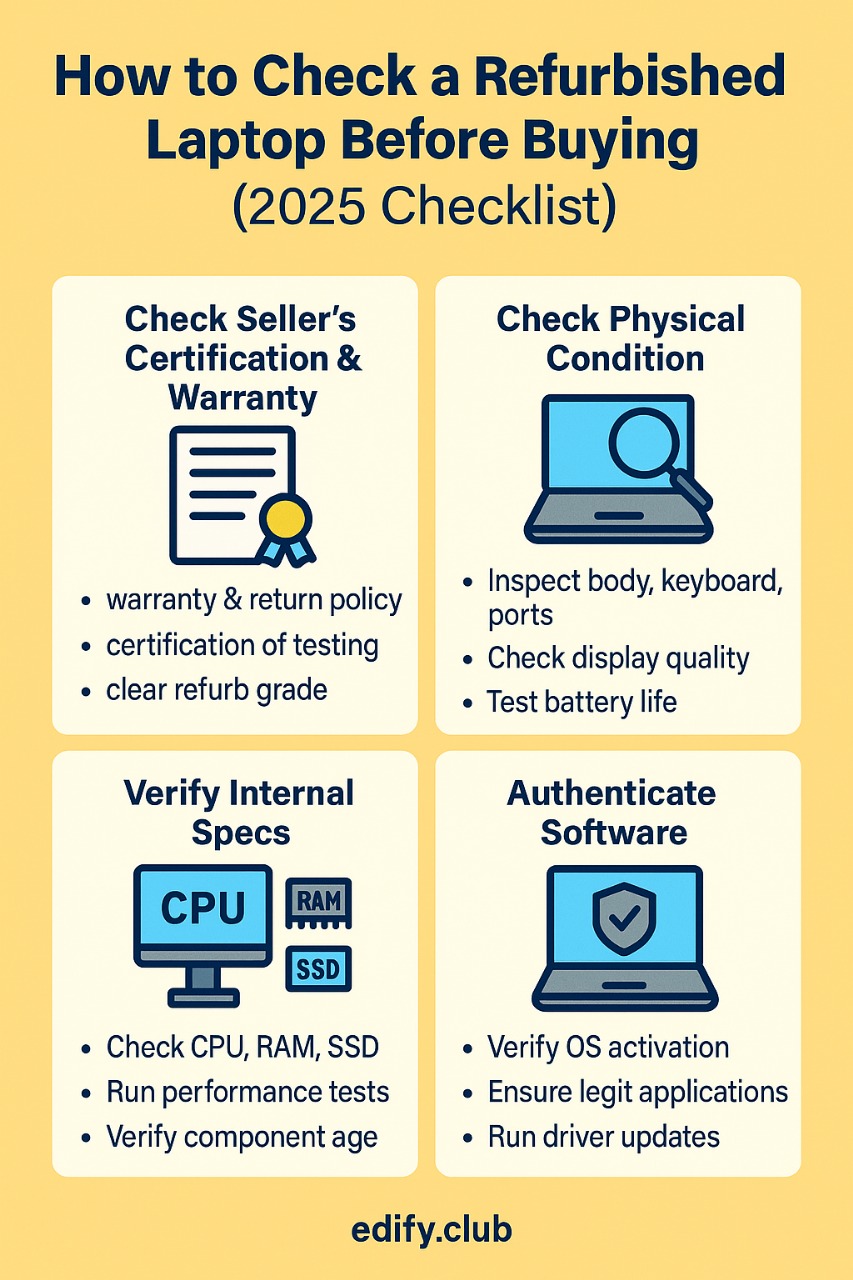
Complete 2026 Checklist: How to Check a Refurbished Laptop Before Buying
Check the Seller’s Certification & Warranty First
The first thing you must verify before buying any refurbished laptop is whether the seller provides proper certification and a clear warranty policy. A legitimate refurbished laptop comes with documentation proving it has been tested, restored, and certified to meet quality standards. Demand a warranty of at least 6 to 12 months that covers hardware defects, battery issues, and component failures. Avoid sellers who offer vague “as-is” policies or no written guarantee. Check if the certification includes details like the grade of refurbishment (A, B, or C), parts replaced, and testing reports. In India, many unverified sellers simply clean old laptops and resell them without actual refurbishment, leaving buyers with hidden problems within weeks. A warranty protects your investment and confirms the seller stands behind their product. Platforms like Edify.club provide certified refurbished laptops with transparent warranties and proper documentation, ensuring you buy with confidence instead of fear.
A genuine refurbished laptop should ALWAYS come with:
✔️ Minimum 6–12 months warranty
✔️ Return option
✔️ Certification of testing
✔️ Clear refurb grade
✔️ Billing + GST
What to avoid
-
Random sellers on OLX
-
Facebook Marketplace “dealers”
-
Deeply underpriced listings
-
No warranty or testing report
Why certified sites matter
Certified platforms replace internal parts, run diagnostic tests, and ensure business-class quality. For example, sites selling models like:
-
Lenovo ThinkPad T450 (i7) — https://edify.club/products/lenovo-thinkpad-t450-intel-i7-5th-gen-14-hd-windows-10-refurbished
-
Lenovo ThinkPad L450 (i5) — https://edify.club/products/lenovo-thinkpad-l450-intel-i5-5th-gen-14-hd-windows-10-refurbished
-
HP EliteBook 840 G6 (i5) — https://edify.club/products/hp-elitebook-840-g6-intel-i5-8th-gen-14-hd-windows-11-pro-refurbished
These platforms generally offer 14-day returns, EMI, and COD, making them safer than unverified sellers.
Check Physical Condition (External Inspection)
Inspecting the physical condition of a refurbished laptop reveals whether it was properly restored or just superficially cleaned. Start by examining the laptop body for cracks, dents, or deep scratches that indicate poor handling or internal damage. Check the screen for dead pixels, discoloration, or backlight bleeding by displaying a white and black image. Inspect the hinges by opening and closing the lid at least 5 times to ensure they move smoothly without wobbling or cracking sounds. Look at the keyboard and touchpad for worn-out keys, missing letters, or unresponsive areas. Examine all rubber feet on the bottom to confirm they are intact, as missing feet cause overheating. Verify the serial number sticker is present and matches the system information, as tampering suggests questionable refurbishment practices. Certified sellers like Edify.club provide laptops that pass rigorous 49-point quality checks, ensuring the physical condition meets professional standards before delivery.
When the laptop arrives or if you’re purchasing offline, check:
1. Outer Body
-
Look for dents, cracks, and deep scratches
-
Hinges should be tight and not wobbly
-
Lid should open smoothly
2. Keyboard & Trackpad
-
Check for missing keys
-
Test typing in Notepad
-
Trackpad clicks should be firm
3. Ports
Try plugging in:
-
USB
-
HDMI
-
Charging port
Loose ports = red flag.
Check Display Quality
Display quality reveals critical defects that sellers won’t tell you about upfront. Start by checking for dead pixels: open a blank white screen and look for tiny black or colored dots that don’t light up. Then switch to a full black screen to spot bright stuck pixels. Next, test viewing angles by tilting the screen left, right, up, and down to ensure colors don’t wash out or invert dramatically. Check for backlight bleeding by displaying a black image in a dark room and looking for bright patches along the edges. Examine the screen surface for scratches, cracks, or pressure marks that indicate previous damage. Test brightness levels at maximum and minimum settings to confirm the backlight works properly across all intensities. Finally, verify the hinge mechanism opens and closes smoothly without wobbling or making grinding sounds. Edify.club tests every refurbished laptop display through a 49-point quality check before listing it for sale.
Display issues are common in poorly refurbished laptops.
Things to check:
✔️ No dead pixels
✔️ No yellow patches
✔️ No flickering
✔️ No screen bleeding
✔️ Brightness works at all levels
How to test:
🟦 Full Blue Screen
🟥 Full Red Screen
⬛ Full Black
⬜ Full White
(Android test apps can also help)
Check Battery Health
Battery health is the most critical factor when evaluating a refurbished laptop because it directly determines how long your device runs without charging. Use built-in diagnostics to check battery cycle count and maximum capacity. On Windows, open Command Prompt and type “powercfg /batteryreport” to generate a detailed battery report. A good refurbished laptop battery should retain at least 80% of its original capacity. If the battery has more than 500 charge cycles or holds less than 70% capacity, it will die within 1-2 hours of use and require replacement soon. For MacBooks, hold Option and click the battery icon to see the condition status. Always test the laptop unplugged for at least 30 minutes during inspection. Avoid sellers who refuse battery testing or don’t provide battery health documentation. Edify.club provides certified battery health reports with every refurbished laptop and offers 12-month warranty coverage on battery performance.
This is one of the BIGGEST factors in refurbished laptops.
For Windows
Open CMD → type:
This gives battery cycles + wear level.
Acceptable battery wear
-
0–25%: Excellent
-
25–40%: Good
-
40–50%: Okay for office use
-
Above 50%: Not recommended
If the battery is replaceable, don’t worry too much — Lenovo ThinkPads and HP EliteBooks allow easy replacement.
Check Performance (CPU, RAM, SSD)
Performance testing is the most critical step when buying a refurbished laptop because it reveals hidden defects that visual inspection misses. Start by checking CPU usage in Task Manager while running multiple browser tabs and applications simultaneously. The CPU should stay below 60% under normal workload. For RAM, verify the installed capacity matches the listed specs and run MemTest86 for at least one full pass to detect errors. SSD health requires dedicated tools like CrystalDiskMark to measure read/write speeds and check for bad sectors. A healthy SSD should deliver at least 400 MB/s read speed. Run stress tests for 15-20 minutes to monitor temperature and thermal throttling. Download CPU-Z and GPU-Z to verify all hardware components are genuine and not misrepresented. Every refurbished laptop from Edify.club undergoes comprehensive performance benchmarking with documented test results provided to buyers before purchase.
Both students and small teams want smooth performance.
Do quick checks:
-
Open Task Manager → Performance tab
-
Check if SSD is being detected as NVMe or SATA
-
Confirm RAM speed (DDR3/DDR4/DDR5)
-
Check CPU generation
Good 2026 refurbished picks:
-
8th Gen i5/i7 ThinkPads (Perfect for office)
https://edify.club/products/lenovo-thinkpad-t480-intel-i5-8th-gen-14-hd-windows-11-pro-refurbished -
HP EliteBook 840 G6
https://edify.club/products/hp-elitebook-840-g6-intel-i5-8th-gen-14-hd-windows-11-pro-refurbished
How to Check Laptop is New or Refurbished (Brand-wise Guide)
A lot of people ask:
“How do I know if my Lenovo / HP / Dell / Acer laptop is new or refurbished?”
Here’s a brand-by-brand guide:
Lenovo: How to Check if a Laptop is New or Refurbished
To check if a Lenovo laptop is new or refurbished, start by entering the serial number on Lenovo’s official warranty checker at support.lenovo.com. A new laptop shows the full manufacturer warranty starting from your purchase date, while a refurbished unit displays a shorter warranty period or a start date that predates your purchase. Next, inspect the packaging: genuine new Lenovo laptops arrive in sealed boxes with all original accessories, manuals, and protective films on the screen and keyboard. Check the laptop’s BIOS by pressing F2 during startup to see the first boot date. If it shows a date months or years before your purchase, the device was previously used. Look for signs like missing screws, scratches on screw heads, or aftermarket parts inside. The battery cycle count in Lenovo Vantage software reveals usage history, with new laptops showing under 5 cycles. When buying from certified refurbishers like Edify.club, you receive transparent documentation about refurbishment history and remaining warranty coverage.
Steps:
-
Go to Lenovo support website
-
Enter serial number
-
Check:
-
Manufacturing date
-
Warranty start date
-
If warranty already expired long ago = refurbished
-
Lenovo ThinkPads usually show refurb info through warranty renewal logs.
HP: How to Check if My HP Laptop is New or Refurbished
To check if your HP laptop is new or refurbished, examine the serial number on the bottom of the device or in the BIOS settings. Visit HP’s official warranty check page, enter the serial number, and review the purchase date and warranty status. A new laptop shows a recent manufacture date matching your purchase date, while refurbished units display an older original purchase date or shorter warranty period. Check the battery cycle count in HP Support Assistant or command prompt. New laptops have fewer than 10 cycles, while refurbished units show 50 to 300 cycles depending on prior use. Inspect the packaging for factory seals, original HP branding, and complete accessories. Look for physical signs like keyboard wear, screen scratches, or loose hinges that indicate previous use. If buying refurbished intentionally from certified sellers like Edify.club, you receive full transparency about the laptop’s history, professional restoration details, and warranty coverage documentation.
-
Visit HP Warranty Check page
-
Enter serial number
-
Check
-
Factory ship date
-
Warranty type
-
Previous support claims
-
If the system shows “Commercial System Refurbished” — it’s not new.
Dell: How to Check if My Dell Laptop is New or Refurbished
To check if your Dell laptop is new or refurbished, visit Dell’s official website and enter your Service Tag (found on the bottom of the laptop or in BIOS). The warranty page will display the original ship date and warranty status. A new laptop shows a recent ship date matching your purchase date, while a refurbished one shows an older original ship date. You can also call Dell support at 1800-425-4026 with your Service Tag for verification. Check the battery cycle count in Windows PowerShell using the command “powercfg /batteryreport” — a new laptop has under 10 cycles, while refurbished units have 50 to 300 cycles depending on prior use. Inspect the packaging for factory seals and look for any signs of previous use like worn keys or screen marks. For verified refurbished Dell laptops with transparent history and warranties, Edify.club provides detailed refurbishment reports with every purchase.
-
Visit Dell Support
-
Enter service tag
-
Check
-
Manufacture year
-
Ownership transfer history
-
Service logs
-
If ownership has changed multiple times → refurbished.
Acer: How to Check if Acer Laptop is New or Refurbished
To check if your Acer laptop is new or refurbished, locate the serial number on the bottom panel or inside the battery compartment, then visit Acer’s official warranty check page and enter it. A new laptop shows the original warranty start date matching your purchase date, while a refurbished unit displays an earlier activation date or shows “out of warranty” status. You can also examine the packaging: genuine new Acer laptops arrive in sealed boxes with all original accessories, protective films on the keyboard and screen, and intact tamper-proof seals. Check the battery cycle count using Windows PowerShell command “powercfg /batteryreport” – a new laptop has 0 to 5 cycles, while refurbished units show 50 or more. Look for physical signs like minor scratches, uneven screw wear, or replaced components. Certified refurbished sellers like Edify.club clearly label their Acer laptops as refurbished and provide complete testing reports with transparent battery health data.
Acer shows refurb units with:
-
“Recertified” tag
-
Shorter warranty
-
Updated dispatch date
Check via Acer Care Center using serial number.
Internal Component Testing (Very Important!)
A true way to check refurbished laptop quality is testing internal hardware.
Recommended tests:
✔️ SSD speed test (CrystalDiskMark)
✔️ CPU stress test (IntelBurnTest)
✔️ RAM test (MemTest)
✔️ Fan noise test
✔️ Thermals (HWMonitor)
If temperature crosses 90°C regularly, the laptop is poorly refurbished.
Check Software Authenticity
Verify:
-
Genuine Windows 10/11 license
-
No pirated Office
-
Updated drivers
-
No bloatware
Go to Settings → Activation
You should see:
“Windows is activated with a digital license”
Why Refurbished Makes Sense for Students, Professionals & Startups (Solution Section)
Your audience segment faces specific challenges:
Students & Early Professionals
Students and early professionals gain the most from refurbished laptops when they prioritize battery health and warranty coverage over superficial appearance. A college student needs a laptop that lasts through 4-hour lecture sessions without dying, which means checking for at least 80% battery health before purchase. Young professionals working remotely require verified processor speeds and RAM that match their workflow, not marketing claims. The biggest mistake this group makes is choosing the cheapest option without documentation. Always demand a proper invoice, warranty certificate, and testing report that proves the laptop passed technical checks. Budget constraints are real, but a ₹25,000 certified refurbished laptop with 12-month warranty protects your investment better than a ₹20,000 unverified deal that fails within weeks. Edify.club provides students with grade-specific refurbished laptops that include transparent testing reports and warranties designed for academic timelines.
Problems:
-
Limited budget
-
Need reliable laptop for assignments, coding, research
-
Battery backup and durability matter
Solution:
Refurbished business laptops like ThinkPads or HP EliteBooks offer:
✔️ Strong build
✔️ Amazing keyboard
✔️ Stability
✔️ Budget-friendly prices
✔️ Pre-installed Windows
These outperform cheap new laptops under ₹30,000.
Small Business Owners & Startups
Small business owners and startups benefit massively from refurbished laptops because they can equip entire teams at 40-60% lower costs compared to buying new devices. When you’re bootstrapping or managing tight budgets, spending ₹80,000 on a new laptop versus ₹35,000 on a certified refurbished ThinkPad or Dell Latitude makes a huge difference in your runway and hiring capacity. Before purchasing, verify the warranty coverage extends to at least 6-12 months, check that all hardware components function properly for daily business tasks, and confirm the seller provides invoice documentation for asset records and potential tax benefits. Refurbished laptops let you allocate more capital toward marketing, product development, or hiring instead of locking funds in depreciating hardware. For scaling teams quickly without compromising on quality, platforms like Edify.club offer business-grade refurbished laptops with proper certification and support designed specifically for startup environments.
Problems:
-
Need multiple laptops within budget
-
Device must handle multitasking
-
Consistent performance for team
Solution:
Buying refurbished helps in:
✔️ Saving 50–70%
✔️ Deploying high-quality business laptops
✔️ Setting up teams affordably
✔️ Getting warranty + bulk support
Imagine setting up 4 team laptops for the price of 1 new one — huge win!
Remote & Freelance Workers
Remote and freelance workers need refurbished laptops that deliver consistent performance for video calls, multitasking, and long work sessions without the premium price tag of new devices. When checking a refurbished laptop as a remote professional, prioritize battery health above everything else since you cannot rely on constant power access. The battery should hold at least 80% of its original capacity and last a minimum of 4-5 hours under normal workload. Test the webcam and microphone quality thoroughly, verify that the Wi-Fi connectivity is strong and stable, and ensure the keyboard can handle 8-10 hours of daily typing without sticking keys. Check that the processor is at least an Intel i5 or AMD Ryzen 5 equivalent to handle multiple browser tabs, communication apps, and work software simultaneously. Remote workers shopping at Edify.club get laptops specifically tested for professional use cases with transparent battery reports included.
Problems:
-
Need portability
-
Quick boot
-
Long battery life
-
No downtime
Solution:
8th Gen i5/i7 refurbished laptops with SSDs provide:
✔️ Fast performance
✔️ Low maintenance
✔️ Professional build quality
✔️ Great keyboards for writing/coding
Comparison Table: Top Refurbished Laptops in India 2026
| Model | Best For | Specs | Price Range | Buy Link |
|---|---|---|---|---|
| Lenovo ThinkPad T450 (i7) | Students, Office Work | i7 5th Gen, 8GB RAM, SSD | ₹15,999 | https://edify.club/products/lenovo-thinkpad-t450-intel-i7-5th-gen-14-hd-windows-10-refurbished |
| ThinkPad L450 (i5) | Students, Basic Office | i5 5th Gen | ₹13,699 | https://edify.club/products/lenovo-thinkpad-l450-intel-i5-5th-gen-14-hd-windows-10-refurbished |
| HP EliteBook 840 G6 (i5 8th Gen) | Startups, Remote Workers | i5 8th Gen, SSD, 14″ | ₹21,000 | https://edify.club/products/hp-elitebook-840-g6-intel-i5-8th-gen-14-hd-windows-11-pro-refurbished |
| Lenovo ThinkPad T480 (i7 8th Gen) | Multitasking, Coding | i7 8th Gen, SSD | ₹22,700 | https://edify.club/products/lenovo-thinkpad-t480-intel-i5-8th-gen-14-hd-windows-11-pro-refurbished |
| HP EliteBook 840 G6 (i5) | SME Teams | i5 8th Gen | ₹21,000 | https://edify.club/products/hp-elitebook-840-g6-intel-i5-8th-gen-14-hd-windows-11-pro-refurbished |
Best Sites to Buy Refurbished Laptops in India (2026)
When searching best site to buy refurbished laptops India, look for:
✔️ Certification
✔️ Warranty
✔️ Return policy
✔️ Business laptops (ThinkPad, EliteBook, Latitude)
✔️ Transparent grading
Avoid sites selling gaming laptops with replaced motherboards — unreliable in long run.
Helpful External Resources (Latest Information)
These videos help understand performance, real usage, and buying mistakes:
-
Best Laptops of 2026
https://www.youtube.com/watch?v=mytp7tgGIJQ -
The Laptops We Actually Use!
https://www.youtube.com/watch?v=eLnZV5airqs -
Black Friday Laptop Mistakes to Avoid
https://www.youtube.com/watch?v=OBJ7JiVAgpE
Final Verdict
Buying refurbished laptops in India is absolutely safe — if you know what to check. From battery health to screen quality, warranty verification to brand-specific refurb checks, following this guide will help you choose a laptop that’s reliable, durable, and value-packed.
Whether you’re a student, freelancer, or business owner, refurbished business-class laptops give premium performance at a budget-friendly price. And if you want certified laptops with warranty, return policy, and EMI, platforms like Edify.club make the process easier and safer.
Feel free to explore more guides and product pages to find the perfect fit for your needs 😊
Frequently Asked Questions
Most buyers want to know if refurbished laptops are reliable, how to spot fake refurbishment, and what warranty coverage they should expect. The battery health is the number one concern, since old batteries lose 30-50% capacity and replacement costs ₹3,000 to ₹8,000 depending on the model. Physical damage like screen scratches, broken hinges, or faulty keyboards are common red flags that indicate poor refurbishment quality. Buyers also ask whether certified refurbished means the laptop was properly tested or just wiped clean and resold. Warranty duration matters greatly because genuine refurbished laptops come with at least 6-12 months of coverage, while unverified sellers offer little to no protection. Serial number verification helps confirm the laptop’s original manufacturing date and previous ownership status. People frequently wonder if refurbished laptops support modern software and whether upgrading RAM or storage is possible post-purchase. Platforms like Edify.club address these concerns by providing detailed inspection reports and transparent quality certifications with every refurbished laptop.
1️⃣ How do I quickly check if a refurbished laptop is worth buying in India?
Check warranty, battery health, SSD speed, and physical condition before paying.
2️⃣ How can I confirm if my Lenovo laptop is new or refurbished?
Enter the serial number on Lenovo’s support site to see warranty history and refurb status.
3️⃣ How do I know if my HP laptop is refurbished or brand new?
Use HP’s Warranty Check tool; older ship dates or “refurbished” tags confirm status.
4️⃣ What’s the safest site to buy refurbished laptops in India?
Choose certified stores with warranty, return policy, and business-class laptops.
5️⃣ How many battery cycles are acceptable in a refurbished laptop?
Anything below 300 cycles or under 35% wear is ideal for daily use.
6️⃣ Is a refurbished Dell laptop reliable for students and office work?
Yes! Dell Latitudes offer strong build, stable performance, and long-term durability.
7️⃣ What should I check first when buying a refurbished laptop?
Always confirm the seller’s certification, warranty, and return policy.
8️⃣ Is a refurbished laptop better than a new budget laptop under ₹30,000?
Absolutely—business laptops give stronger performance and durability.
9️⃣ Can refurbished laptops handle coding, editing, or multitasking?
Yes, especially 8th Gen i5/i7 ThinkPads, EliteBooks, and Latitudes.
🔟 Do all refurbished laptops come with SSD and upgraded RAM?
Not always—check specs to ensure SSD storage and enough RAM for smooth use.
Frequently Asked Questions
Most buyers ask whether refurbished laptops are reliable, how to spot fake refurbishment, and what warranty coverage they should expect. The battery health question tops the list since replacement batteries cost ₹3,000 to ₹8,000 depending on the model. People also want to know which brands hold value best after refurbishment (Dell, HP, and Lenovo lead here), how to verify the original manufacturing date, and whether cosmetic scratches affect performance. Serial number verification is critical because counterfeit devices flood Indian markets. Smart buyers always ask about return policies, with 7-day windows being standard but 15-day policies offering better protection. The operating system authenticity question comes up frequently since pirated Windows installations create security risks and compliance issues for businesses. Students specifically ask about student discounts on already-reduced refurbished prices. Edify.club addresses these concerns with transparent testing reports and certified refurbishment documentation for every laptop.
Q: How to check if a refurbished laptop is good quality in India?
A: Check the laptop’s physical condition, test all ports and functions, verify battery health, confirm warranty coverage, and ensure the seller is reputable with proper return policies.
Q: What should I inspect before buying a refurbished laptop in India?
A: Inspect the screen for dead pixels, test keyboard and trackpad functionality, check battery cycles, verify RAM and storage capacity, and ensure all ports work properly.
Q: Is it safe to buy refurbished laptops in India 2025?
A: Yes, it’s safe when buying from certified refurbishers with warranties. Always check return policies, seller reputation, and verify the laptop’s condition before purchasing.
Q: What warranty should I expect on refurbished laptops in India?
A: Most reputable sellers offer 3-12 months warranty on refurbished laptops in India. Always confirm warranty terms, coverage details, and service center availability before buying.
Q: How to test refurbished laptop battery before buying?
A: Check battery health using built-in diagnostics, verify charging cycles, test actual battery life versus advertised capacity, and ensure the charger works properly with stable connection.
Buy the Lenovo ThinkPad on Edify Club
₹16,800–₹56,300 · 12-month warranty · 49-point quality check · Free shipping across India
Buy the HP EliteBook 840 G6 on Edify Club
₹32,900–₹45,000 · 12-month warranty · 49-point quality check · Free shipping across India
Sources & References
Background reading and authoritative references for the data and context in this article:
- IDC India — PC market trends, shipment data, and consumer buying behavior in India.
- Counterpoint Research — Refurbished electronics market analysis and India tech consumer insights.
- Economic Times — Reporting on India’s refurbished laptop market and consumer electronics trends.
- United Nations Global E-waste Monitor — E-waste statistics and circular economy data relevant to refurbished electronics.
- Intel Ark — Technical specifications for Intel processors mentioned in refurbished laptop models.


No Comments
Leave a comment Cancel